Your questions, answered.
-
Hookpad is a songwriting sketchpad that makes it easy to write chord progressions and melodies that sound good together.
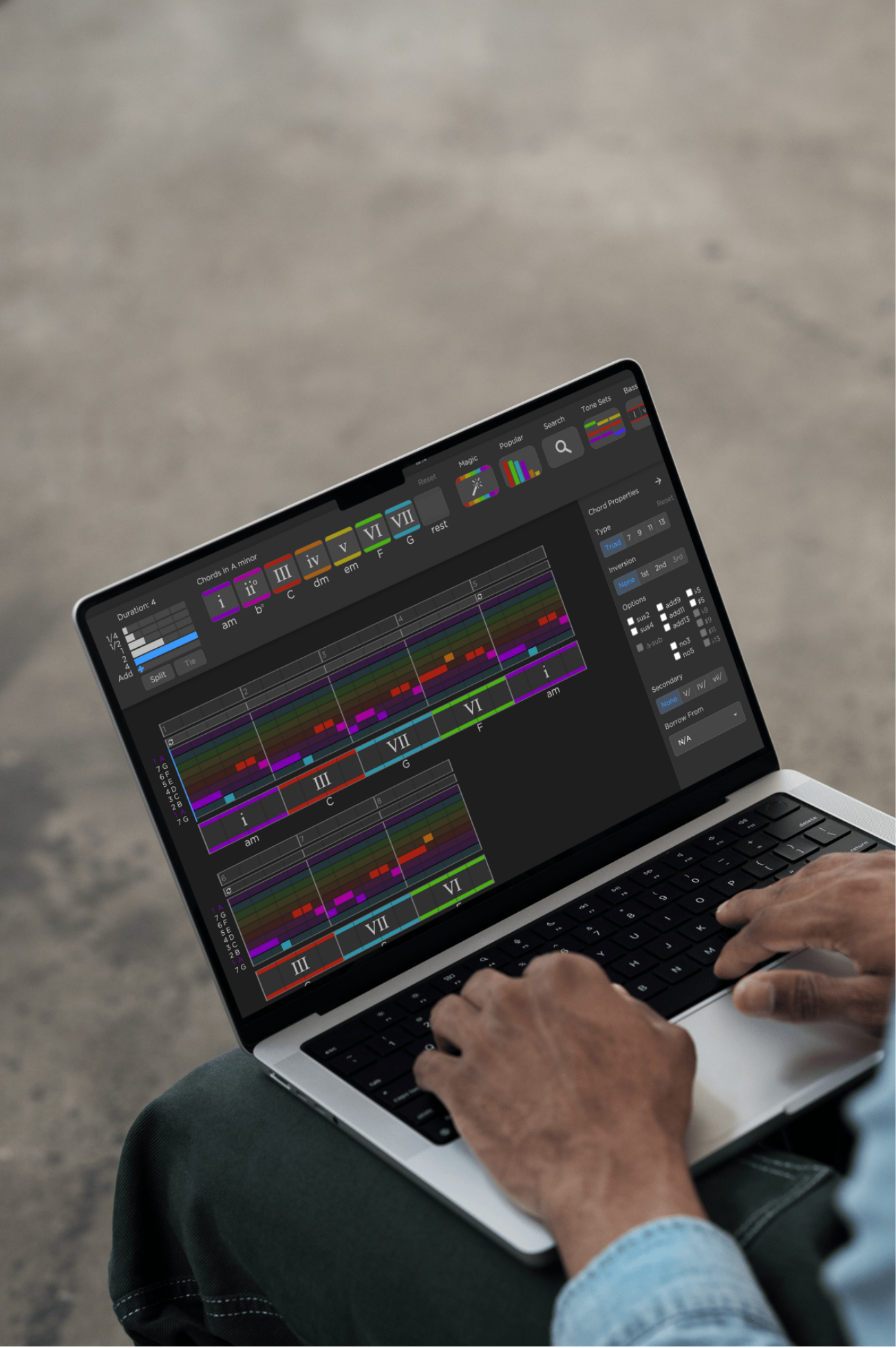
Much like a DAW, it uses a piano roll-like staff to represent music, but it has a separate chord staff so you can build up a progression chord by chord rather than note by note. This makes it very quick to get a musical idea on the page.
It's also music theory aware and understands keys, scales, and chord function so it can present default options that are musically relevant and likely to sound good together. Colors are used to represent note and chord function relative to your song's key. If your song is in the key of C major, a C major chord will have a particular color (red by default) to highlight its function as the home base chord of your song. Similarly, melody notes are colored relative to their position within the scale.
While Hookpad can create complex sounds and now supports many different instrument mixes, it is not intended to be a replacement for a DAW like Ableton Live or Logic Pro. It can stand on its own as an independent end-to-end tool, or, for DAW users, it can be the first step in a professional workflow for getting the core musical ideas right and supports track export into a DAW of choice for final mixing.
-
We like to say that Hookpad is a "music theory aware" songwriting tool. But no, you do not need to know music theory to use Hookpad. Hookpad is designed to be accessible to musicians of all levels and backgrounds.
If you don't know any music theory, Hookpad makes it easier to write a musically coherent song compared to a DAW or other composition tool because the default options presented to the user will "just work". Hookpad knows what key your song is in and presents chords that work in that key and (by default) hides ones that don't. You can turn on note guides to help you write a melody that fits with the chords you have chosen. If you don't know how to make a particularly complex chord on your instrument, that's ok. For example, if you want to hear what a Cmin7b5 sounds like and add it to your song, you can do that with a just a few clicks. Hookpad is used in many elementary school music classrooms because it's easy enough for a young child to use.
That said, if you do know music theory, Hookpad's language will be very familiar to you, and you can get even more out of it. Hookpad is a music editor built from the ground up with concepts from functional harmony and classical music theory. You write chords with Roman Numerals (aka Nashville numbers) and scale degrees (solfege) relative to a key. Hookpad knows about secondary dominants, modes, chord extensions, and inversions. Non-diatonic chords are borrowed from other modes.
All that is to say: Hookpad is used by musicians with all levels of music theory knowledge - from 1st graders in their first music class experiencing how easy it is to write their first song with 4 chords and a simple melody, to talented singer songwriters and EDM composers without formal music theory training that just want to write music that sounds good and for the editor to get out of their way, to classically trained professional composers who live and breathe music theory and want an editor that understands their language.
-
No, however, it's worth taking a moment to explain why Hookpad is set up this way out of the box and why we think it's a useful notation to use for writing music.
Hookpad defaults to numbering the notes and chords relative to your song's key rather than using specific note names. For example, in C major, all C chords and notes are colored red and labeled with a "one". The reason this makes sense from a songwriting perspective is that the particular key your song is in and notes it uses doesn't matter all that much. For example, if you were to write the same song in D major instead of C major, it will have completely different notes and chords, but unless you have perfect pitch you likely wouldn't be able to tell by listening which version you were hearing. By using a numbered notation, this sameness is preserved and allows you to think in terms of musical function; a D functions very differently in the key of C than in the key of D, but a "one" chord is always a "one" chord.
Jazz musicians are used to reading from fake books that use this kind of notation and effortlessly transpose songs into different keys on the fly. Classically trained musicians are used to anaylizing music in this way as well. Hookpad brings this idea to songwriting which both simplifies the process by removing the need for fluency in key signatures and music theory, while also unleashing the power of composing in an editor that priortizes musical function first.
That said, if you prefer to think in absolute note and chord names (e.g C, dm, em, F, G rather than I, ii, iii, IV, V), that's ok. Hookpad labels these note names to the left of the piano roll melody staff and below each chord. By default, Hookpad shows a compressed melody staff showing notes that are only in the key of the song with notes that out of the key in the background. However, you can switch the note entry interface to "chromatic" and the staff to "expanded" to see the full range of notes and chords even the ones outside your song's key to make Hookpad more "DAW-like".
-
There are a few options:
- Chord Search If you have a specific chord in mind (say you want an E major chord in your song written in C major but aren't sure where Hookpad is hiding it) there is a Chord Search tool where you just type the chord name and Hookpad will find it for you.
- Popular Chords Hookpad's Chord interface has a "Popular Chords" palette that shows the top 30 most commonly used chords in popular music. There is a good chance your chord is in this list. This includes many common chords that are outside the key of your song and is a great way to explore new sounds that still make sense musically.
- Tone Sets If you aren't even sure what chord you want but know the notes that make up the chord, you can use the "Tone Sets" Chord Builder tool to build a chord from scratch. Hookpad will figure out what chord you are trying to make and allow you to enter it into your song.
-
Hookpad does not currently have the ability to automatically detect and analyze the chords and melody from audio or video, though it is something we are working on. However, Hookpad is the interface used by the community to analyze new songs for the Theorytab database. If you're creating a new TheoryTab, you'll want to sync the YouTube video with your chords and melody in Hookpad. Follow the instructions on our Hookpad user guide here.
-
Aria is a cutting edge music model trained on Hooktheory's public Theorytab database of popular song analyses. It can suggest chords and melodies based on the music you have already written in your Hookpad project. It is a great way to get unstuck when writing a song or to explore new musical ideas. You can read more about Aria and how it works here Aria. Aria is available as a separate subscription package on top of Hookpad.
-
Yes. You can use Hookpad's sounds and patterns in your own songs, including commercial releases. You own the music you create in Hookpad and we claim no rights to it.
The only restriction is that you may not resell or redistribute the sounds themselves (for example, as a sample pack or instrument). They are licensed for use in your music, not for standalone distribution.
-
Hookpad has a touch mode that will work on a tablet such as an iPad. See our blog article 5 Tips for Using Hookpad on iPad. Hookpad will load on a smart phone in a pinch but is not suitable for editing. We are looking into makng an iPhone version.
-
Hookpad is a Web App hookpad.hooktheory.com that works in the browser. We are looking into building a native app. If you purchase a subscription for Hookpad, it will work for any future iOS / Android app.
-
There is a limited demo version that is free. This free version lets you write full songs with default instrument playback and limited use of advanced features. The full version supports midi export, instruments, lyrics, and more.
-
You can read the books in any modern web browser at hooktheory.com. They're also available as native apps for iOS and Android devices.
-
Yes. The web app (at hooktheory.com) requires an internet connection, while native apps on iOS and Android download all material and can be read offline without internet connection.
-
Yes, but only if you create an account with us. Whether you purchase the app on an iOS or Android device, you can access your purchase on Hooktheory.com by signing into your account.
Please note: if you purchase the book on iBooks, it will NOT connect with the web-version or the app version, as it is a standalone book.
-
Our books are designed for all levels, regardless of skill, instrument, sheet music literacy, or music theory knowledge.
- Beginners who want to understand how popular/song-writing oriented music theory works, without having to read traditional sheet music.
- Intermediate users who already understand basic chord progressions and melody, and want to deepen their understanding (e.g. of extended chords, modes, minor keys, etc.).
- Anyone who prefers hands-on learning with examples, interactivity, and applications (audio/visual + Hookpad integration).
Book I introduces foundational concepts: scales, the six basic chords, chord function, making melodies "chord aware," tension & release in melody, simple progressions and harmonies.
Book II is more advanced: it expands into seventh chords, chord inversions, secondary chords (chords borrowed from related keys), minor key harmony, modes (e.g. Dorian, Mixolydian), extended/suspended chords, and songwriting techniques like controlling energy, using deception, etc.
-
Unlike traditional theory texts, Hooktheory I and II are interactive, visual, and focused on real songs you already know. Instead of dense staff notation, they use an intuitive color-coded system to show how chords and melodies function together. The books include hundreds of audiovisual examples from popular music, plus built-in exercises and connections to Hookpad, so you can immediately apply what you learn in your own songwriting. This practical, modern approach makes theory easier to understand and more directly useful for creating music.
-
Yes! Our books can be read in light or dark mode. To adjust these, change your device settings.
-
Chord Crush is an interactive web app that teaches you to recognize chords and chord progressions over time!
-
"Conventional" ear training courses attempt to cover a bunch of stuff that quite frankly, most of you are not interested in. Being able to tell the difference between diminished 7th and minor 6th intervals, or knowing whether an augmented 6th chord is "Italian" or "German" is great if you teach classical music. But for most of the rest of us, we just want to hear a song and know how it goes on a guitar or piano. Chord progressions are the foundation of music, and learning to recognize them is the best thing you can do to improve your musicianship.
-
You will be presented with a chord progression pulled from a real song from our Theorytab Database with some of the chords missing. Drag a chord from the available options below to fill in the missing ones! If you get the puzzle correct, your rating will improve and you will be served slightly more challenging puzzles. Your rating is a reflection of your strength at hearing chords and the system uses it to target puzzles precisely at the difficulty appropriate for your level!
-
That’s ok! The puzzles at the lower rating levels are meant to be solvable by beginners. If you think the puzzles you are getting are too difficult, getting a few in a row wrong will cause the system to naturally adjust what type of puzzle you get. At the lower levels, you can click on the chords to hear how they sound for help. As your rating improves we gradually remove the ability to "preview" chord sounds until you can identify chords just by hearing them.
If you’re looking for more resources to help you learn, check out the Hooktheory Book Series on our website. -
Very hard. The Hooktheory song database contains some very complex progressions in exotic modes, with tricky borrowed chords, and jazzy embellishments. Even if you have perfect pitch, you will be challenged!
-
Yes. It was designed for phones/tablets. It also works great with a mouse and large screen.
-
Not yet. For now, just the web app at chordcrush.hooktheory.com. If you purchase a subscription for Chord Crush, it will work for any future iOS / Android app.
-
Consistency is key when training your ear! Our brains can only absorb so many new patterns at once and in one sitting. Trying to do a little bit every day will likely yield better results than cramming in a longer session one day per week!
-
Chord Crush is based on a relative numbered system for identifying chords as they relate to a key. The goal is to identify chords in this relative system and to hear the numbers rather than particular names. So for example, you will learn to hear a progression as one → four→ five not C → F → G. You don't need to know all the ins and outs of Roman Numeral notation to get a better ear though it definitely provides some context.
-
The basic version is free but has limited functionality: you can do 5 puzzles per day and 1 Rush game! If you'd like to remove these limits Chord Crush is $50 per year billed annually.
-
Conventional tabs and sheet music are great for showing you how to play a song, but they're not ideal for understanding how everything fits together
A TheoryTab is like a guitar tab, but instead of only showing the chords of a song, it also shows the music theory behind it. They're synced with their accompanying YouTube videos, so you can follow along in real-time.
TheoryTabs display the melody by using color blocks that are numbered 1-7, which correspond to the notes on the major scale.
Chords are displayed 1-7, but are displayed as roman numerals. Learn more about why roman numerals are so important in music notation here.
For a visual walkthrough of our TheoryTabs, watch this video.
-
All of our TheoryTabs are contributed to our site by users like you! Every TheoryTab can be revised at any time by any registered user. Each TheoryTab has a full version history similar to Wikipedia.
To edit a TheoryTab, follow this guide.
Please note: Hooktheory is a collaborative, community-driven project, and maintaining quality and respectful contributions is essential. Users may be flagged if they:
- Consistently submit inaccurate, misleading, or intentionally incorrect TheoryTabs.
- Delete or overwrite good work from other contributors without reason.
- Use offensive, inappropriate, or spammy content in their submissions.
- Repeatedly ignore transcription guidelines or community feedback.
-
TheoryTabs are created collaboratively by the people that use this site. Every TheoryTab can be revised at any time by any registered user. Each TheoryTab has a full version history similar to Wikipedia.
To create a new TheoryTab, you'll need to follow the steps on our contributor guide.
-
Hooktheory computes several metrics for each song in the TheoryTab database to describe how its chords and melody behave. These are percentile-scores (i.e. how a song stacks up against others in the database). All metrics are on a scale of 1-100, with 1 being the least complex, and 100 being the most complex.
Chord Complexity
How "rich" or "complex" the chord progression is. It takes into account things like how many non-standard or non-diatonic chords are used/exceed what's typical in other songs. More unexpected chord choices or frequent chord changes increase complexity.Melodic Complexity
How much variety and rhythmic/melodic interest is in the melody. This includes how many notes are outside the scale or off-beat rhythms, syncopation, etc. A more melodic "twistiness" or less predictable melody tends to produce a high score.Chord-Melody Tension
How the melody interacts with the chords underneath. Specifically, how many melody notes are unstable with respect to the current chord (i.e. notes that are not part of the chord), how often that happens, and how long such unstable notes last. Unstable or non-diatonic notes create tension. More tension = higher score (though too much tension might be dissonant).Chord Progression Novelty
How "fresh" or "unusual" the chord progression is compared to what's already common in the database. If a chord progression is very similar to many others, novelty is lower; if it uses unusual progressions, or uncommon chord relationships, novelty is higher.Chord-Bass Melody
Looks specifically at the bass notes in chord progressions and whether the bass line moves in a smooth / stepwise way (ascending or descending scale degrees etc.), which helps with the flow. Progressions with more interesting, smooth or well-crafted bass motion get higher scores.You can learn more about our song metrics here.
-
At the moment it is not possible to change your username. You are welcome to create a new account with a different username, but you cannot currently change your existing username.
-
Go into My Account and click "Delete Account" at the bottom of the page. Please note that this action is irreversible and will permanently delete all of your data.
-
Go into My Orders to find a list of all your purchases. There is an option to cancel active subscriptions.
-
Please visit the Community Forum and search to see if your question has already been asked. If it hasn't, post your question and we will try to answer it within two business days. To post to the forum, you can login with your Hooktheory credentials.
-
Occasionally, this can happen after you've made a purchase. We recommend you clear your Hookpad cookies, sign out of your Hooktheory account, close your browser, re-open your browser, and re-login. You can also hit Shift+F5 to force a reload of the app to the latest version.
One thing to be aware of is that it is possible to be logged into the website but not Hookpad/Chord Crush (they are separate systems), so if Hookpad/Chord Crush isn't working make sure sign in and out of those apps, not just the main Hooktheory website.
-
Unfortunately, due to bots creating spammy TheoryTabs, we had to add an automated moderation layer that can sometimes flag submissions incorrectly. A human will receive a notification and should automatically unblock you in a day or two. You can also contact support to let them know you were blocked in error if you need the review expedited.
-
Follow the contact us link from this page. Someone from support will get in touch about setting up payment and getting your account setup.
-
When you are ready for your Classroom license to start, contact support and they will flip the switch and point you to the Classroom manual for getting started setting up your courses so your students can join and use Hookpad and read the book.
-
At this time, courses can only have one teacher account which can be shared if needed.
-
Hooktheory Classroom does not currently support Google Classroom integration. However, you can easily share your unique course code with your students via Google Classroom to facilitate their account creation and access to Hooktheory Classroom.
Still have questions?
Get in touch with us directly at support@hooktheory.com or subscribe to our newsletter for product updates, new features, and Hooktheory news.